A fair, visible singer order
Manage singer status, reorder the rotation, and keep a separate song queue for each singer. Duplicate protection and undo/redo help you correct live edits.
Voci / Karaoke for hosts and venues
A busy karaoke night needs more than a player. Voci brings your singers, requests, music, and audience display into one workspace, with a record of the show when the last song ends.
Current source: Voci 1.3.0 · Published Windows installer: 1.2.3. Checked October 11, 2026. Availability and platform qualification vary. Downloads and checksums.
Inside the app
Actual captures of the macOS app, populated with 30 fictional singers and recognizable contemporary song titles. The demo media is generated test audio; commercial recordings are not included.
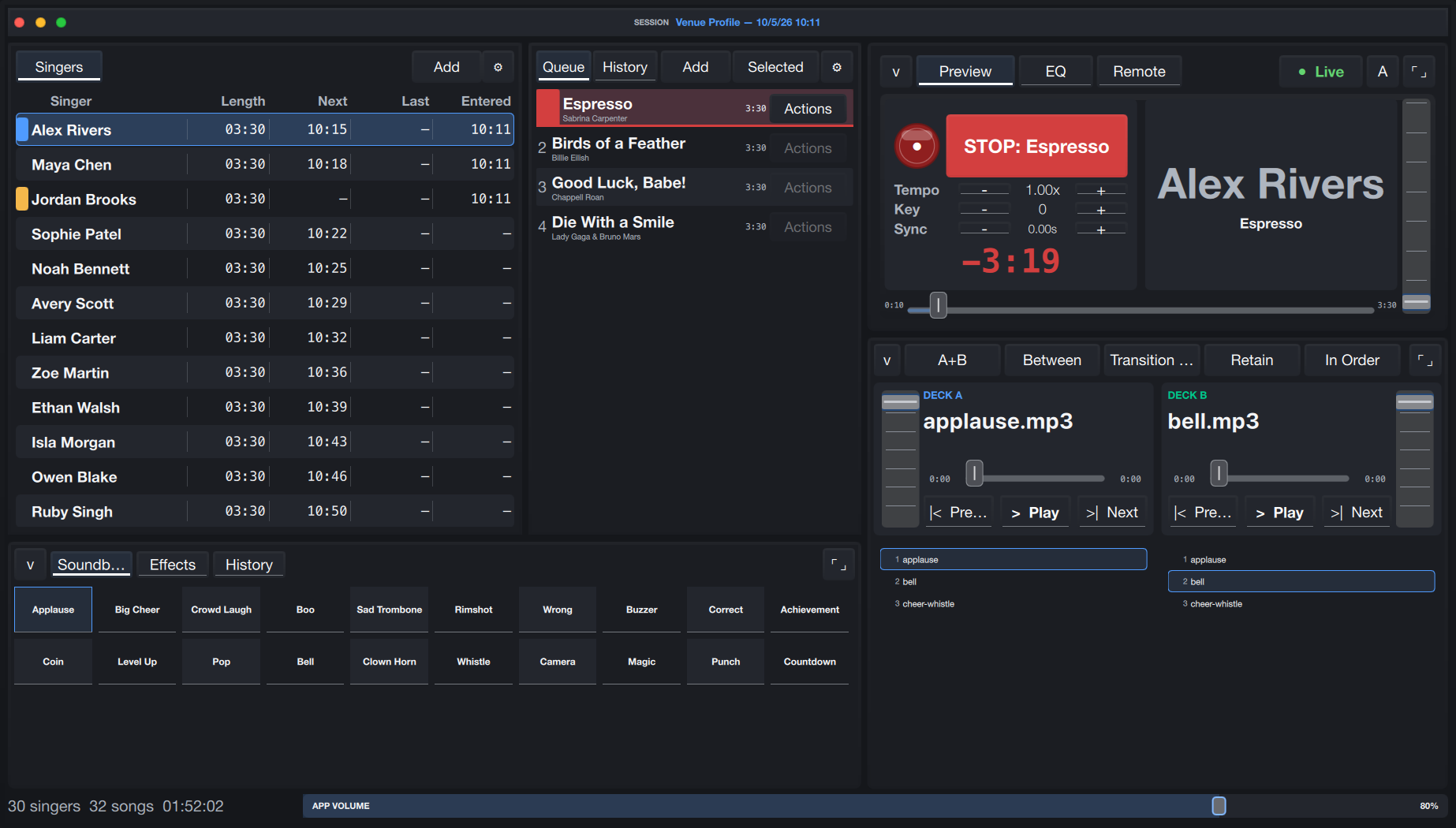
Keep the rotation, each singer’s queue, playback controls, soundboard, and music decks together. Select a singer to see their requests without losing sight of the room.
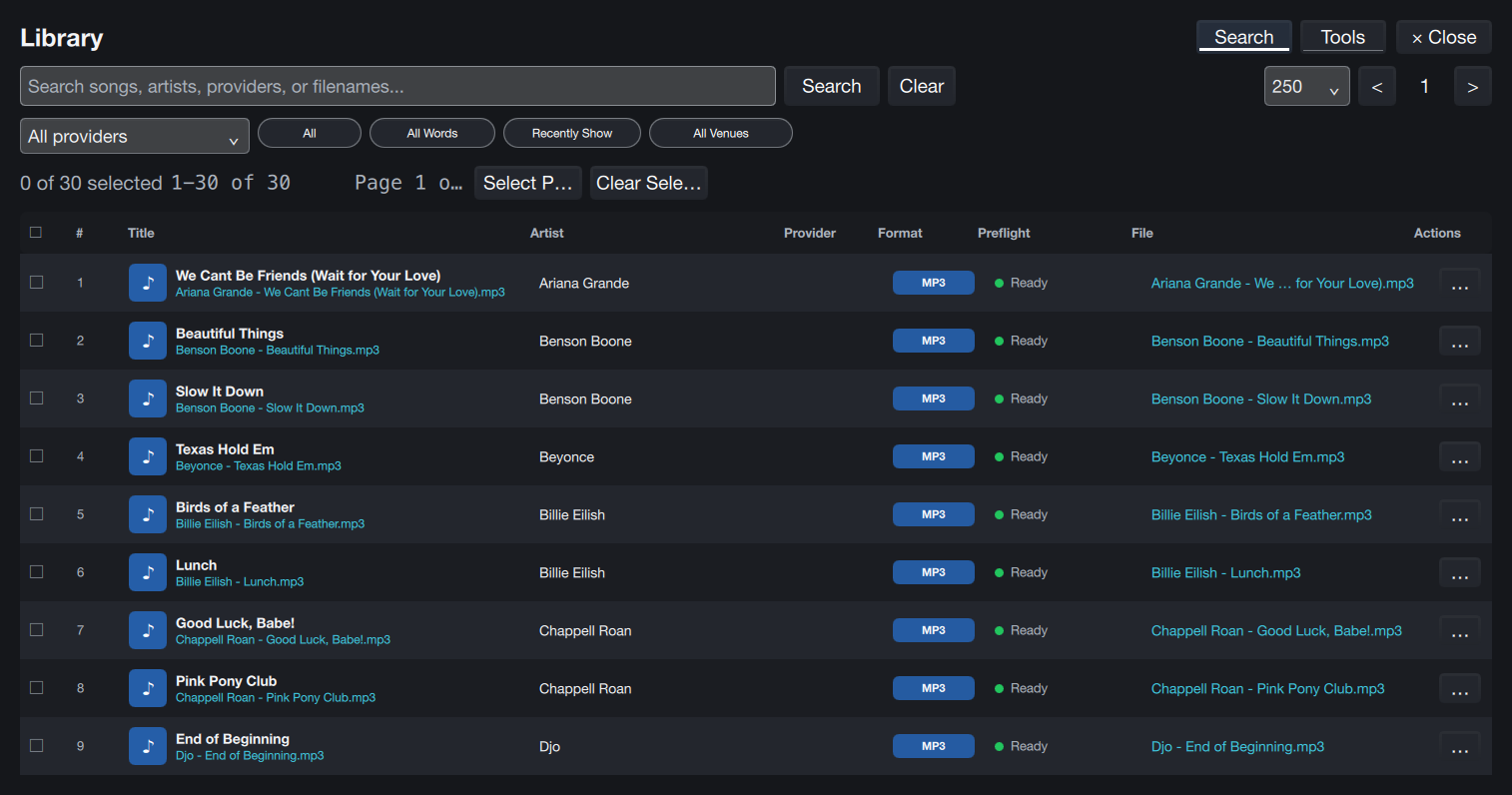
Browse local media, search by title or artist, and narrow results by karaoke provider. Check media issues before a request becomes a live interruption.
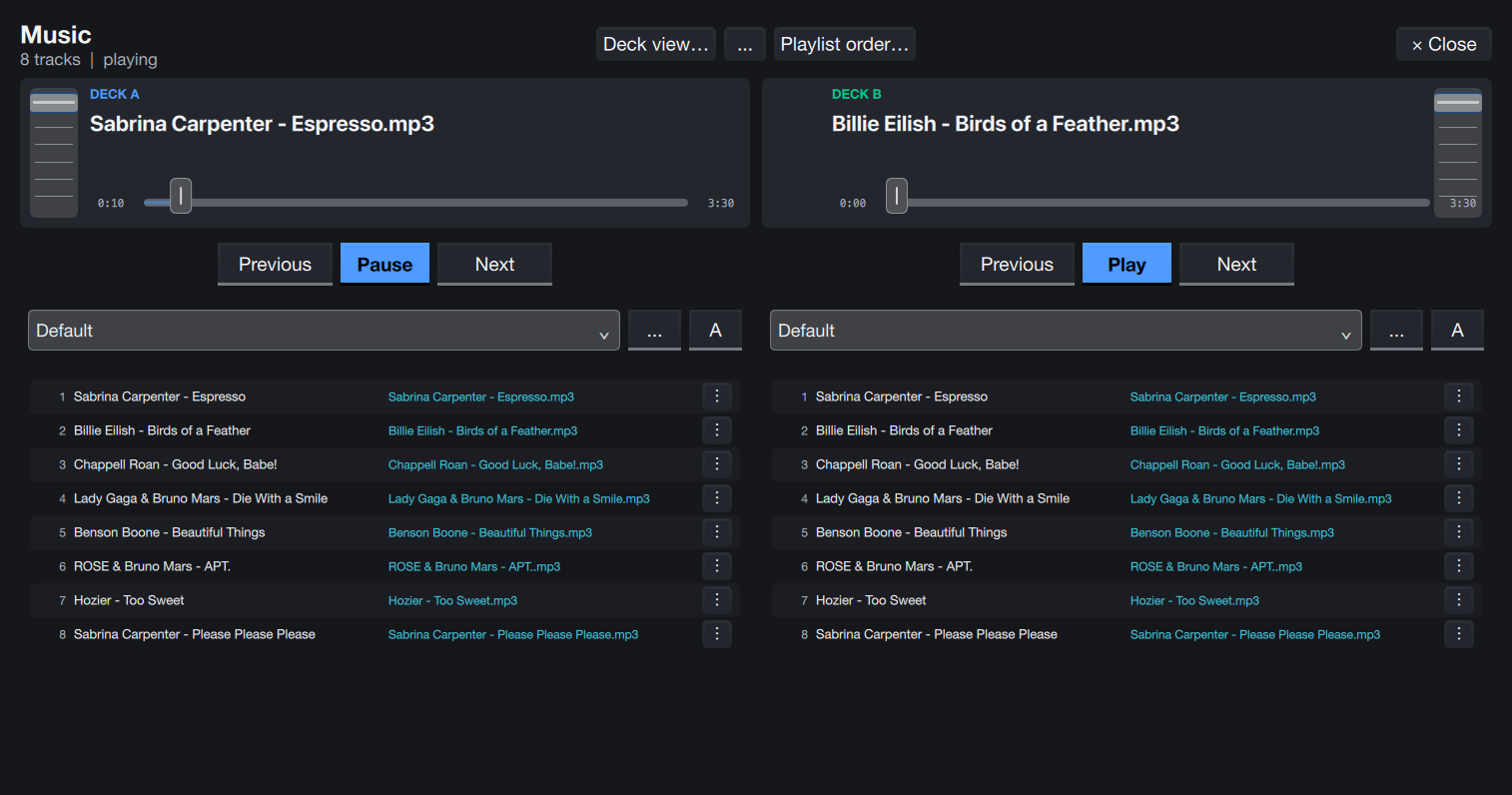
Prepare two independent decks with playlists, fades, shuffle, autoplay, a crossfader, and per-deck EQ. Background Music playback requires its licensed feature.
Select any screenshot to view it at full size. Screenshots show a development build and demo data; licensed features are enabled in the isolated demo.
From doors open to last call
Prepare the room, manage the rotation, and finish with a recoverable show and useful records. Each feature has a job to do.
Manage singer status, reorder the rotation, and keep a separate song queue for each singer. Duplicate protection and undo/redo help you correct live edits.
Index local media folders, browse a large library in pages, and search songs by title, artist, or provider. Provider labels help distinguish different karaoke versions.
Play CDG and video karaoke, preview the queued song, pause, stop, seek, and jog. Keep current and upcoming performances visible from the operator workspace.
A dedicated audience window handles lyrics and now-playing information. Show or hide it, use fullscreen, and cycle displays as your venue setup changes.
Tonight Bar guides readiness checks and routes you to the relevant controls. Media preflight flags missing files, unreadable tracks, and missing CDG pairs.
Save and recover the current session, rename the show, archive and restore it, and keep preferences between nights. Session Properties keeps the current show’s details close.
Adjust key, tempo, lyric sync, and 15-band EQ. Use singer EQ defaults, intro/outro fades, start-skip controls, and DJ effects to suit the performance.
Run Background Music with independent A/B decks, playlists, shuffle, autoplay, fades, transitions, a crossfader, and per-deck EQ. Prepare playlists before licensing playback.
Use soundboard clips and editable sound sets. Tune audience backgrounds, idle messages, marquee styling, lyric colors, and scheduled between-performance ad inserts.
Run browser and QR request intake on a trusted venue network. Review, accept, deny, or retry requests, and manage singer logins while keeping the venue’s rotation under host control.
Manage DJ profiles, venue records, regular singers, and per-venue history. Import or export profiles, and keep reusable venue settings separate from the current show.
Search and filter Session History, review statistics and activity calendars, and export reports as CSV, text, JSON, GCF, or PDF. Licensed library tools include supported MP3 tag editing.
Choose the workflow you need
Core karaoke remains useful without a license. Optional licensed features unlock additional controls while preserving your existing data.
For local evaluation and the essential show workflow.
Guided startup and show-readiness confirmation remain required. The audience screen carries an Evaluation Mode notice. Unavailable paid controls are hidden while saved data is preserved.
For hosts who want more control over the live night.
Advanced Audio and Background Music are enforced license families. Presentation and Soundboard are enforced through authenticated Pro/Business or eligible audio/music capabilities, without separate signed tokens.
For venue identity, request intake, and owner review.
Remote Requests, Venue Profiles, and Reports & Exports are licensed feature families. Exact entitlements depend on the issued key. Explore Voci Business.
Current source / 1.3.0
Current source adds shared lyric updates, smoother visual timing and safer media switches. A singer can share one performance with up to four partners. Supported multi-voice text can use distinct colors and a part legend.
These additions have local macOS evidence. The Windows download is version 1.2.3; later source features are not automatically included. Existing screenshots show an older development build.
Bring your own local library. Current-source local macOS checks cover single-pair MP3+G ZIP; WAV, FLAC, OGG-Vorbis, M4A-AAC and Opus with CDG; scoped LRC, millisecond SYLT and untimed USLT; plain SRT/WebVTT with supplied inline timing; and UltraStar legacy/v1/v2. Decoder availability and the exact format profile matter. KAR/MIDI synthesis, scoring and stems are outside current support.
Business Remote supports browser requests on an explicitly shared trusted local network, with host review. QR sharing does not make the desktop a public internet service.
Voci does not supply a commercial catalog or music rights. Recording preserves original karaoke assets and has dry device-capture foundations; complete app-source capture, bundle replay and venue qualification remain open.
Open the Windows release archive for the published installer and its SHA-256 checksum. Signed offline licenses enable paid features; automatic subscription activation is not promised here. Pro pricing remains unsettled, and the Business offer awaits billing activation.
Current product state
The shared desktop app targets macOS, Windows, and Linux. These screenshots show the macOS development build, not certification of every platform or venue setup.
Licensing: the desktop app imports and verifies signed offline license keys. This page does not offer checkout or promise automatic subscription activation.
Recording: recording controls and native .voci bundle foundations exist. Finished live-performance capture and app-source recording still need validation.
Updates: signed checks and verified downloads are implemented. Production installation, restart, and rollback remain qualification work.
Accounts: hosted singer profiles can connect favorites and activity across configured venues. Phone requests use a browser; no native mobile app is required or claimed.
Bring your real workflow
One host or a team. One venue or a regular circuit. Get in touch about Voci’s current availability and the features your room needs.